> For the complete documentation index, see [llms.txt](https://whitepaper.earn.network/en/llms.txt). Markdown versions of documentation pages are available by appending `.md` to page URLs; this page is available as [Markdown](https://whitepaper.earn.network/en/1.-defi-staking/for-rewards-providers/adding-rewards-process.md).
# Adding Rewards Process
Learn to quickly add diverse rewards on the DeFi Staking platform.
The Earn Network provides a comprehensive and user-friendly platform for adding various types of rewards to staking pools. Whether you're considering tokens or NFTs, our platform accommodates your needs, enabling a customized approach to reward distribution. This page outlines the process for adding rewards, including ERC-20 tokens, ERC-721 and ERC-1155 NFTs. Follow the links below for detailed guidance on each reward type:
* Adding ERC-20 Tokens as rewards
* Adding ERC-721 NFTs as rewards
* Adding ERC-1155 NFTs as rewards
\
**Adding the ERC-20 token as a reward**
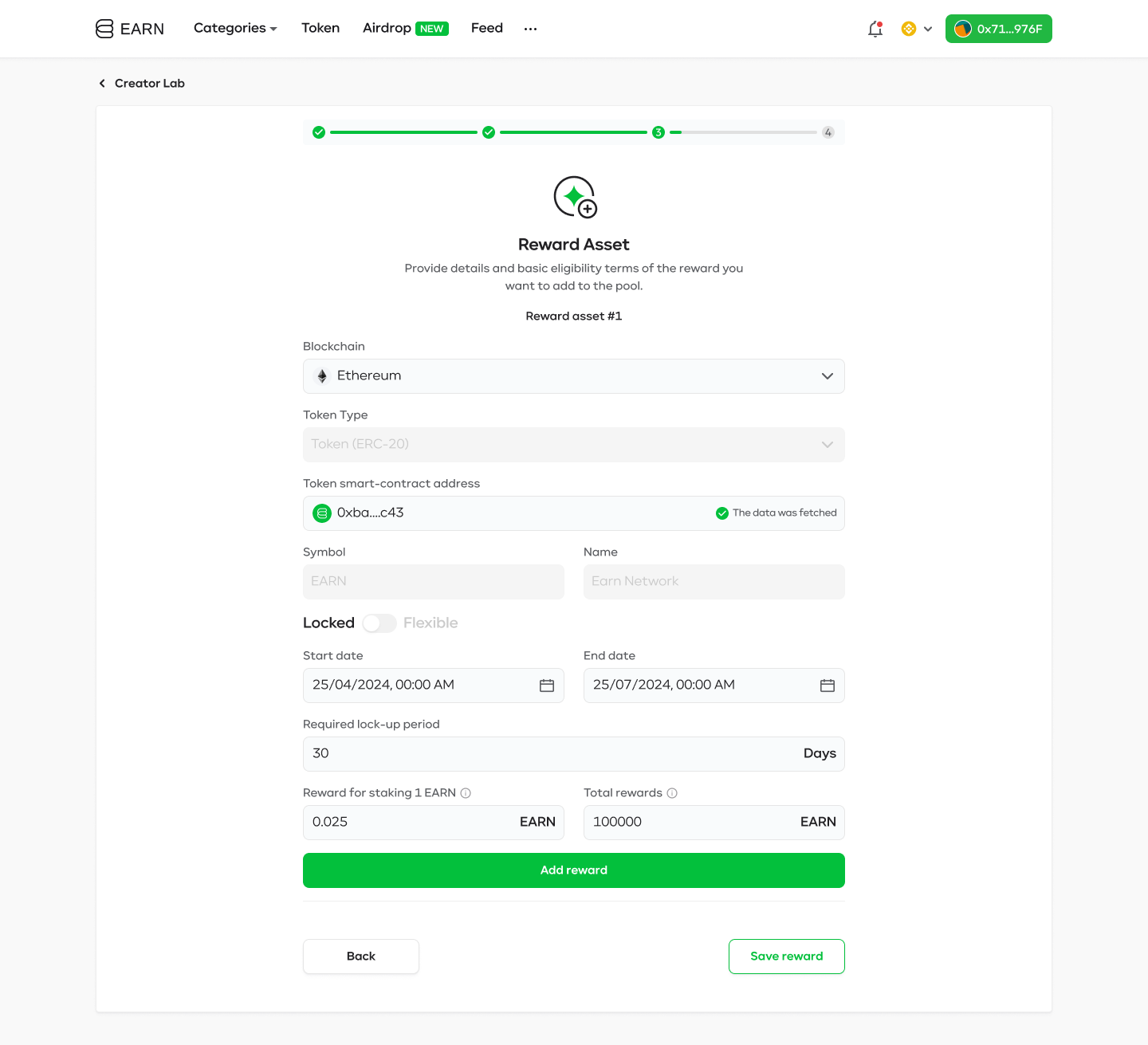
1. **Provide token details**\
Select the blockchain, token type (ERC-20) and provide the address of the desired token.
2. **Specify reward type and time**\
Choose the reward type. You may pick between locked and flexible terms, depending on your distribution strategy, then select the start and end date of your reward pool.
3. **Specify rewarding conditions**\
Decide on the amount of rewards you would like to provide, and, if it's the flexible reward, specify how many tokens will be released every second. If you want to provide a locked reward, you have to specify for how long users will have to lock their tokens and how many rewards they will get for staking the specified amount.
4. **Save the reward**
Once you've added all necessary details, click "Save" to make your draft available in the Creator Lab. Here, your pool awaits approval.
5. **Activate the reward**
Once your pool receives approval, it will be ready for activation, contingent upon completing the payment process. This payment can be made using USDT or, for 10% savings on activation fees, with EARN tokens.
6. **Promote the reward**
After the payment is processed, your rewards will be visible on the Earn Network Platform, under the selected staking pool. This is the perfect time to begin promotion to inform your community about this opportunity.
**Adding ERC-721 NFT as a reward**
1. **Blockchain and token type selection**\
Select the blockchain, NFT type (ERC-721) and contract address of the collection that you want to add.
2. **Specific token IDs specification**\
Enter the desired ID numbers of NFTs that will be added as rewards.
3. **Availability dates**\
Choose the start and end date of your reward pool.
4. **Required staking amount & lock-up period**\
Decide how many NFTs or tokens have to be staked, and for how long, to receive one NFT.
5. **Save the reward**
Once you've added all necessary details, click "Save" to make your draft available in the Creator Lab. Here, your pool awaits approval.
6. **Activate the reward**
Once your pool receives approval, it will be ready for activation, contingent upon completing the payment process. This payment can be made using USDT or, for 10% savings on activation fees, with EARN tokens.
7. **Promote the reward**
After the payment is processed, your rewards will be visible on the Earn Network Platform, under the selected staking pool. This is the perfect time to begin promotion to inform your community about this opportunity.
**Adding ERC-1155 NFT as a reward**
1. **Blockchain and token type selection**\
Select the blockchain, NFT type (ERC-1155) and contract address of the collection that you want to add.
2. **Specific token ID specification**\
Enter the token ID and number of NFTs that will be added as rewards.
3. **Availability dates**\
Choose the start and end date of your reward pool.
4. **Required staking amount & lock-up period**\
Decide how many NFTs or tokens have to be staked, and for how long, to receive one NFT.
5. **Save the reward**
Once you've added all necessary details, click "Save" to make your draft available in the Creator Lab. Here, your pool awaits approval.
6. **Activate the reward**
Once your pool receives approval, it will be ready for activation, contingent upon completing the payment process. This payment can be made using USDT or, for 10% savings on activation fees, with EARN tokens.
7. **Promote the reward**
After the payment is processed, your rewards will be visible on the Earn Network Platform, under selected staking pool. This is the perfect time to begin promotion to inform your community about this opportunity.